
Why Most People Get Bad Results From AI
Almost every business owner has tried it. You open ChatGPT, type “write me a social media post,” and get back something so generic it could belong to any company in any industry in any city. So you close the tab and decide AI is overhyped.
The tool was not the problem. The prompt was.
AI is not a mind reader. It is an extremely capable assistant that knows nothing about your business until you tell it. When you give it your website, your location, your audience, your service, your goal, and your desired call to action, the output stops sounding like filler and starts sounding like marketing you would actually publish.
This guide gives you twenty prompts we use in real client work at The Real Social Company — prompts for auditing a website, fixing conversions, generating a month of social content, strengthening SEO and AEO, and turning one blog post into an entire campaign. Copy them, fill in the brackets, and use them today.
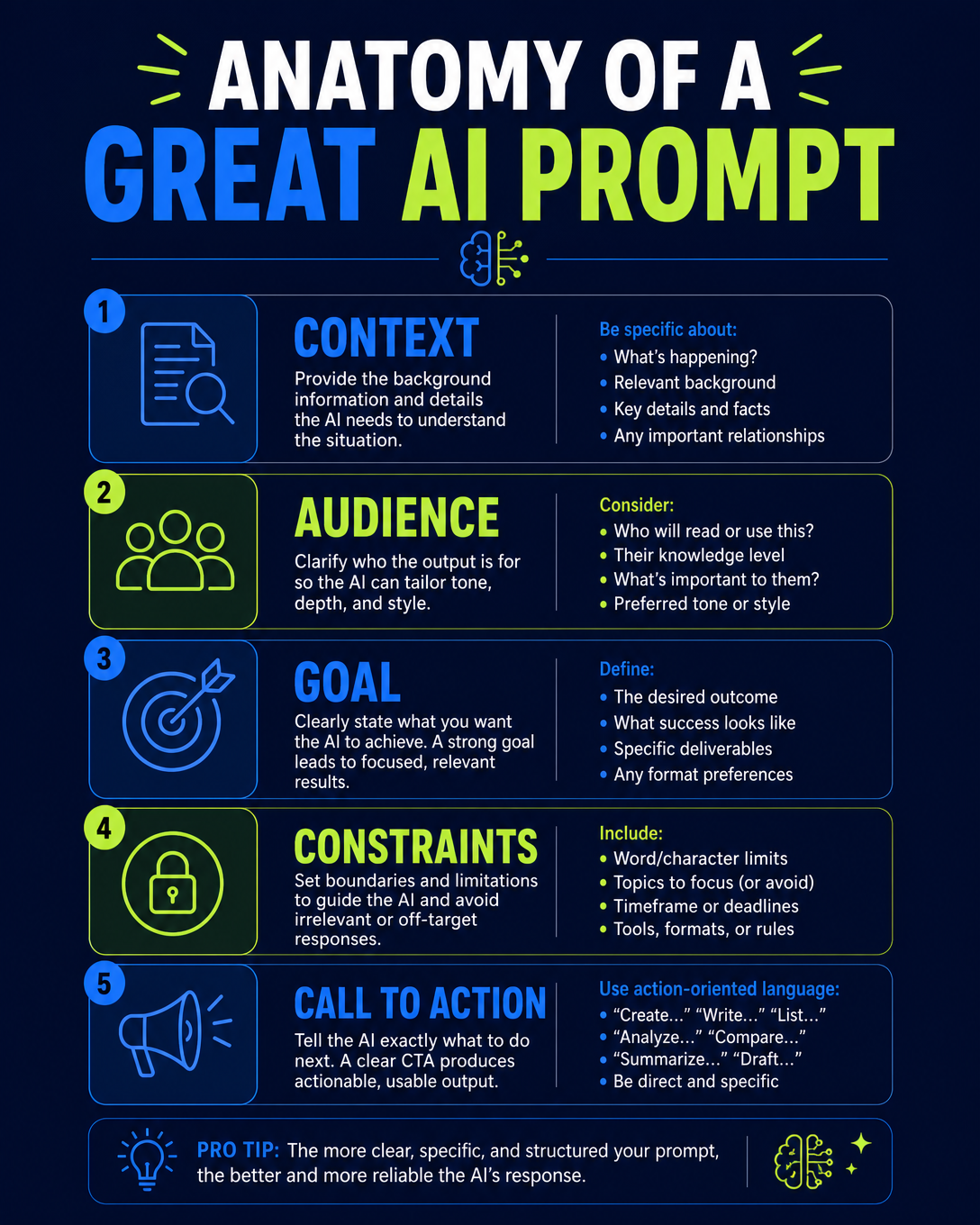
The Five Ingredients Every Good Prompt Has
Before the list, understand the pattern. Every prompt below follows the same structure, and once you see it you can write your own.
- Context — your website URL, your industry, your service area. Without it, AI writes for a hypothetical average business.
- Audience — who you are trying to reach and what they already know. A prompt written for first-time buyers produces different copy than one written for comparison shoppers.
- Goal — more calls, more bookings, more form fills, more visibility in AI answers. Name it explicitly.
- Constraints — length, tone, format, what to avoid. “Avoid repeating the same message” is a constraint, and it dramatically improves content calendars.
- Call to action — what you want the reader to do next. If you do not specify it, AI will default to “Contact us today!” on every single piece.
Miss one of the five and the output degrades. Include all five and the difference is immediate and obvious.
A Note On SEO, AEO, and GEO Before You Start
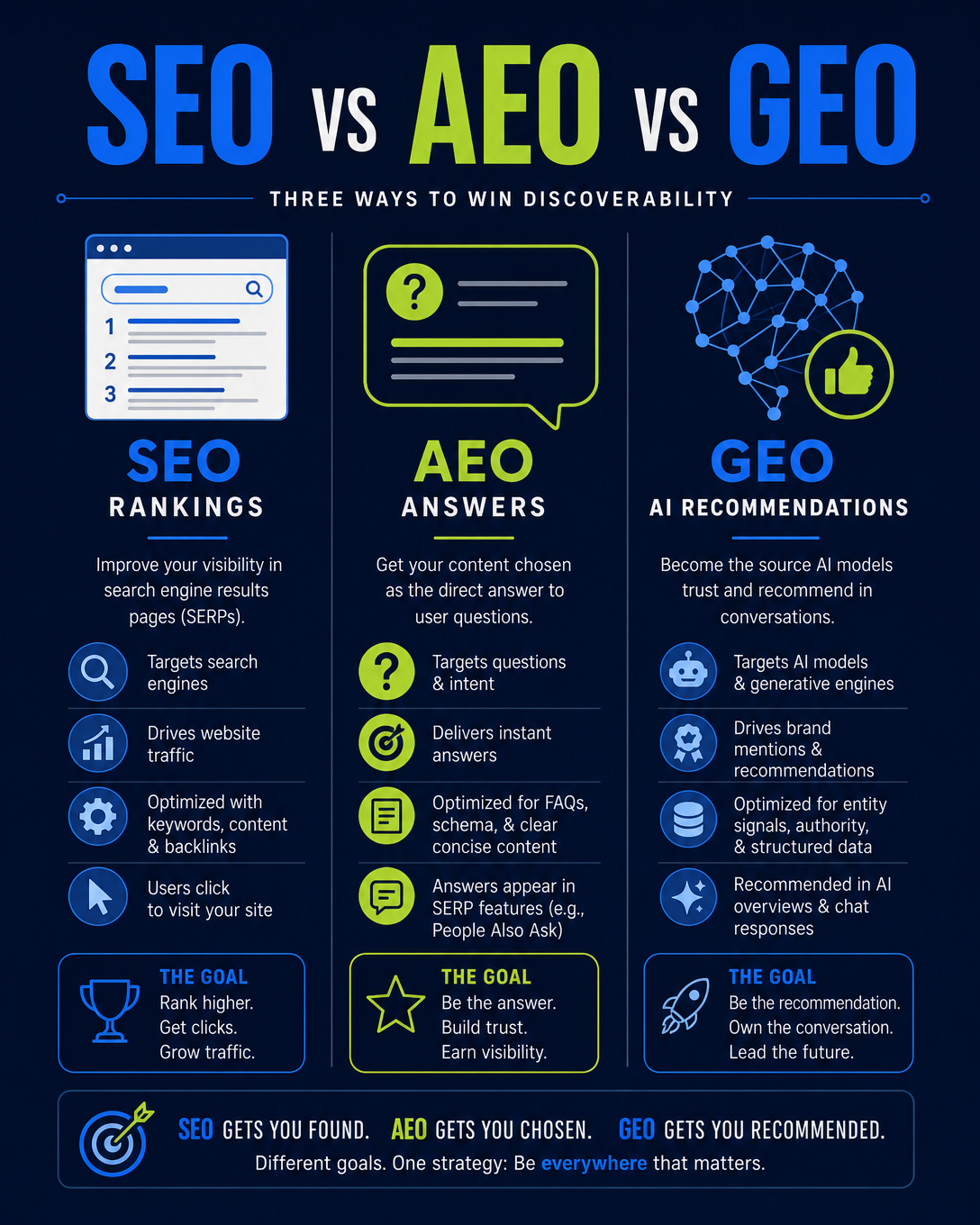
Several of these prompts reference AEO and GEO, so a quick definition is worth having in front of you.
SEO is the classic discipline: earning rankings in traditional search results through relevant content, technical health, page speed, and authority. It still matters and it is still the foundation.
AEO — answer engine optimization — is about being the source that gets quoted when a search engine or assistant answers a question directly instead of listing links. AEO rewards clear question-shaped headings, direct answers stated in the first sentence, FAQ blocks, and clean structured data.
GEO — generative engine optimization — is about being recommended by name inside ChatGPT, Gemini, Copilot, Claude, and Perplexity. GEO depends heavily on consistency: the same business name, address, phone number, and service description everywhere a model can find you, plus enough demonstrated expertise that a model is comfortable putting your name in an answer.
All three run on the same website. You do not choose between them. The prompts below touch all three, and the ones that mention AI platforms by name tend to surface GEO-shaped opportunities you would never get from a generic “help me with SEO” request.
The 20 Prompts
Each prompt below is copy-and-paste ready. Replace anything in brackets with your real information — the more specific you are, the better the output. Under each prompt you will find why it works and how to use the result.
1. Audit My Website
Review my website [WEBSITE URL]. Identify the 10 biggest things hurting SEO, AI search visibility, user experience, and conversions. Prioritize what I should fix first.
Why it works: This is the prompt to run first, every quarter. Most business owners have never had anyone look at their website critically — they have only ever been told it “looks nice.” Asking AI to prioritize is the important part. A list of fifty problems is paralyzing; a list of ten in priority order is a work plan.
How to use the output: Paste the output into a spreadsheet, add an owner and a due date to each line, and work top to bottom. If three or more items involve page speed, structured data, or crawlability, you are past the point where content edits will help — that is an architecture problem. Our Columbus AI SEO services start with exactly this kind of audit.
2. Improve My Homepage
Review [WEBSITE URL]. Rewrite my homepage messaging so visitors immediately understand what we do, who we help, where we're located, and why they should choose us. Include a strong call to action.
Why it works: Homepages fail for one of two reasons: they are vague (“Solutions for a modern world”) or they are all about the company instead of the customer. A visitor decides in roughly five seconds whether they are in the right place. Those five seconds are the highest-leverage real estate you own.
How to use the output: Ask for three versions at three different reading levels, then read each one out loud. The one that sounds like a human explaining the business to a neighbor is usually the winner. Make sure the location shows up in plain language — AI assistants answering “near me” questions need that signal in text, not just in a footer.
3. Find Missing Website Pages
Review [WEBSITE URL] and my competitors. What important service, location, FAQ, or educational pages am I missing that could help me appear in Google and AI search results?
Why it works: You cannot rank for a topic you have not written about, and AI cannot recommend you for a service it cannot find a page for. Content gaps are the single most common reason a business with a good reputation is invisible online.
How to use the output: Group the output into service pages, location pages, and educational pages, then build in that order — service pages convert, location pages capture intent, educational pages earn citations. If the list runs long, that is normal. Our service pages are organized this way for the same reason.
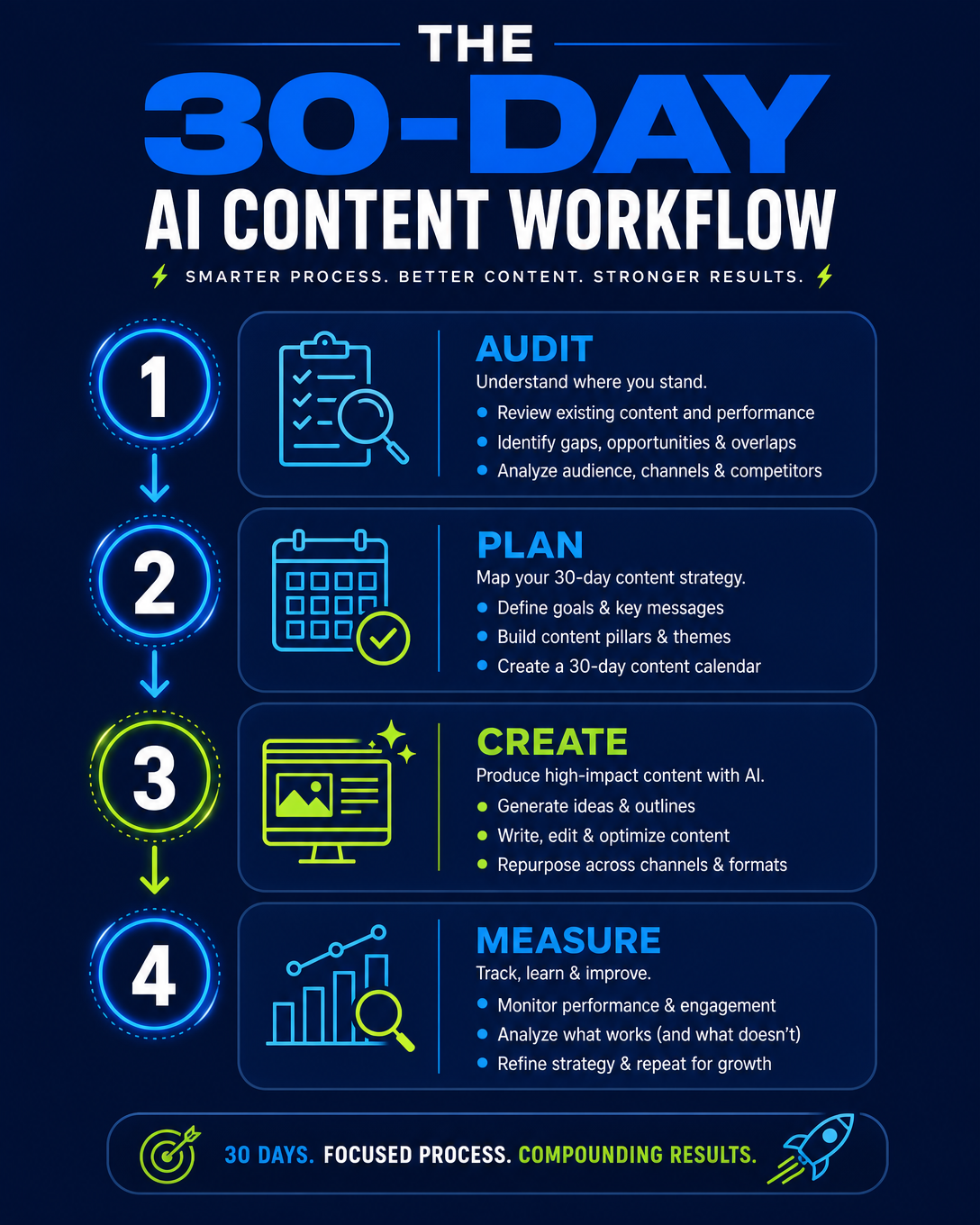
4. Create 30 Days of Social Content
Review [WEBSITE URL] and create a 30-day social media content calendar. Mix educational tips, services, FAQs, testimonials, promotional content, and engagement posts. Avoid repeating the same message.
Why it works: The reason most small business social accounts go quiet is not laziness — it is the blank page. Deciding what to post is harder than posting. A calendar removes the decision entirely.
How to use the output: Ask for the calendar in a table with columns for date, post type, hook, caption, hashtags, and CTA. Then batch-produce a week at a time. The “avoid repeating the same message” instruction matters more than people expect; without it AI will hand you thirty variations of “Call us today.”
5. Turn a Service Into Social Posts
Review this service page: [URL]. Create 10 different social media post ideas from it. Include educational, problem/solution, FAQ, myth-vs-fact, promotional, and benefit-focused posts.
Why it works: Every service page you own is a content mine. One page can carry a month of posts if you slice it by angle instead of by topic.
How to use the output: Rotate angles deliberately. Ten promotional posts in a row train the algorithm — and your audience — to scroll past you. A healthy mix is roughly 60% educational, 20% proof, 20% promotional.
6. Create Better Social Hooks
My business is [BUSINESS TYPE]. Give me 20 attention-grabbing opening hooks for Facebook and Instagram posts. Focus on problems my ideal customers actually experience.
Why it works: The first line decides whether the rest gets read. On mobile, you have roughly two lines before the “more” link truncates you.
How to use the output: Ask AI to write hooks as problems, not as announcements. “Your website loads in six seconds. Here is what that costs you.” beats “We offer web design services.” every single time.
7. Generate Blog Ideas
Review [WEBSITE URL]. Give me 20 blog topics that potential customers are likely to search for on Google, ChatGPT, Gemini, Copilot, and other AI search platforms.
Why it works: Naming the AI platforms in the prompt changes the output. You get more question-shaped, comparison-shaped, and “best X for Y” topics — exactly the queries people type into chat assistants.
How to use the output: Prioritize topics phrased as questions. Question-shaped headings are the raw material of answer engine optimization, and they are far easier to quote. Our guides library is built almost entirely on this pattern.
8. Improve My SEO + AEO
Review [WEBSITE URL] for SEO and Answer Engine Optimization (AEO). Tell me what changes would make the website easier for Google and AI platforms to understand, quote, and recommend.
Why it works: SEO gets you found. AEO gets you quoted. They overlap, but they are not the same job, and most websites are optimized for only the first one.
How to use the output: Look for recommendations about structured data, heading hierarchy, direct answers in the first sentence under each heading, and consistent business information. Those four things do most of the work. See our AEO services for what this looks like implemented.
9. Create an FAQ Section
Review this page: [URL]. Create 10 frequently asked questions with concise, useful answers based on what a real customer would want to know before contacting this business.
Why it works: FAQ sections are the highest-ROI content block on any service page. They answer objections before a human has to, they add relevant keywords naturally, and they are the format AI assistants quote most often.
How to use the output: Keep each answer to 40–60 words, front-load the answer, then add detail. Mark the section up with FAQPage structured data so search and answer engines can parse it cleanly.
10. Turn Reviews Into Content
Here are several customer reviews: [PASTE REVIEWS]. Turn them into 10 social media posts without changing the meaning of what customers said. Add an appropriate CTA to each.
Why it works: You already paid for this content — customers wrote it for free. Most businesses let five-star reviews sit on Google and never use them anywhere else.
How to use the output: The “without changing the meaning” constraint is not optional. Never let AI embellish a testimonial. Quote accurately, attribute honestly, and never invent a review that does not exist.
11. Make My Content Less Salesy
Rewrite this social media post so it sounds helpful and educational instead of like an advertisement. Keep the business positioned as an expert and finish with a natural CTA: [PASTE POST].
Why it works: People do not follow businesses to be sold to. They follow businesses that make them smarter. Expertise sells; announcements do not.
How to use the output: Run this prompt on your existing posts before you write new ones. Most businesses find their entire back catalog reads like a flyer, and rewriting it is faster than starting over.
12. Find Local Content Opportunities
My business provides [SERVICES] in [CITY/REGION]. Give me 20 locally focused website and blog topics that could strengthen our relevance for searches in our service area.
Why it works: Local relevance is not a keyword you sprinkle in. It is demonstrated through content that could only have been written by someone who actually works in that area.
How to use the output: Favor topics tied to neighborhoods, local regulations, seasonal conditions, and area landmarks. Generic “Best [service] in [city]” pages with no local substance are exactly what AI assistants have learned to ignore.
13. Create a Website Conversion Audit
Pretend you're a first-time visitor to [WEBSITE URL]. What might prevent you from calling, booking, purchasing, or submitting a form? Give me specific recommendations to increase conversions.
Why it works: Traffic that does not convert is a very expensive hobby. Doubling your conversion rate is almost always cheaper than doubling your traffic.
How to use the output: Watch for the classics: phone number not clickable on mobile, forms with too many fields, no pricing signals anywhere, CTAs buried below the fold, and no clear next step at the bottom of the page.
14. Repurpose a Blog
Turn this blog post [URL] into a complete content campaign: 5 social posts, 1 email topic, 3 short-form video ideas, 5 FAQs, and 10 social media hooks.
Why it works: One good article should never be published once. A single 1,500-word post contains a month of distribution if you break it apart properly.
How to use the output: Publish the pieces across two to three weeks, not all in one day. Repetition across formats is how a message actually lands.
15. Create Short-Form Video Ideas
Review [WEBSITE URL]. Give me 20 ideas for 30–60 second videos that answer common customer questions and demonstrate our expertise. Include a hook and talking points for each.
Why it works: Short-form video is the fastest trust-builder available to a small business, and the bar for production quality is far lower than owners assume. A phone, decent light, and a clear answer is enough.
How to use the output: Answer one question per video. Say the question out loud in the first three seconds. Add captions — most people watch with the sound off.
16. Analyze My Competitors
My website is [URL]. Compare my online presence with these competitors: [COMPETITOR URLS]. Identify content, services, FAQs, keywords, and website opportunities they're using that I may be missing.
Why it works: Competitive analysis is not about copying. It is about finding the gap between what the market expects and what you currently show.
How to use the output: Ask for the output as a comparison table with a “they have it / we don't” column. The gaps are your roadmap. Do this twice a year, not once.
17. Create Social Posts From FAQs
Give me the 20 questions customers are most likely to ask a [BUSINESS TYPE]. Turn each question into a social media post idea that provides a genuinely useful answer.
Why it works: The questions your customers ask on the phone are the same ones they type into Google and ChatGPT. Answering them publicly is free demand capture.
How to use the output: Keep a running list of questions your team actually gets asked and feed them into this prompt. Real questions outperform AI-guessed questions every time.
18. Improve a Service Page
Review this service page: [URL]. Recommend improvements for SEO, AEO, readability, trust, conversions, FAQs, internal links, headings, and calls to action.
Why it works: Service pages are where money is made and where most websites are weakest. They tend to be short, vague, and written for the business rather than the buyer.
How to use the output: Work through the recommendations in order of buyer impact: trust signals, then clarity, then structure, then technical. A page that earns trust and reads clearly will outperform a technically perfect page that says nothing.
19. Create a Content Funnel
My business is [BUSINESS] and I want more [LEADS/BOOKINGS/SALES]. Create a content funnel connecting social media posts → educational website content → service pages → calls to action.
Why it works: Individual posts do not generate leads. Systems do. A funnel is simply the deliberate answer to “where does this person go next?”
How to use the output: Make sure every educational page links to a service page and every service page links to a booking or contact action. Broken chains are where leads leak out. If you want this built for you, that is essentially what our free consultation maps out.
20. Become My Marketing Assistant
Act as my digital marketing assistant. Review [WEBSITE URL] and create a weekly marketing plan covering my website, SEO, AEO, blogs, Facebook, Instagram, Google Business Profile, email marketing, and short-form video. Prioritize actions most likely to improve visibility and generate qualified leads.
Why it works: This is the capstone prompt. Instead of asking for one asset, you are asking for an operating rhythm — a repeatable weekly plan you can actually follow.
How to use the output: Ask for the plan as a weekly checklist with time estimates. If the total exceeds the hours you honestly have, ask AI to cut it to fit. A plan you complete beats a plan you admire.
How To Run All Twenty Without Losing A Weekend
Twenty prompts looks like a lot. It is not, if you sequence them.
Week One: Diagnose
Run prompts 1, 3, 13, and 16. By the end of the week you will know what is broken, what is missing, what is blocking conversions, and where competitors are beating you. Do not create anything yet. Diagnosis first.
Week Two: Fix The Foundation
Run prompts 2, 8, 9, and 18. Homepage messaging, SEO and AEO improvements, FAQ sections, and service page upgrades. These are the pages that convert, so they get fixed before you spend a dollar driving traffic to them.
Week Three: Build The Content Engine
Run prompts 4, 5, 6, 7, 12, and 17. This is where you generate the calendar, the hooks, the blog topics, the local angles, and the FAQ-driven posts. Batch everything. Schedule it.
Week Four: Distribute And Systematize
Run prompts 10, 11, 14, 15, 19, and 20. Reviews into content, salesy copy rewritten, blogs repurposed, video ideas generated, funnel mapped, weekly plan built. At the end of week four you have a system rather than a pile of posts.
Then repeat quarterly. The audit prompts get faster every time because you are fixing the same problems fewer times.
Mistakes To Avoid When Using AI For Marketing
Publishing raw output
AI drafts. You edit. Every piece needs a human pass for accuracy, voice, and claims. This is not a formality — language models will confidently state things about your business that are simply not true.
Inventing proof
Never let AI generate testimonials, statistics, certifications, or results. Quote real reviews. Cite real numbers. Fabricated proof is both an ethical problem and a legal one, and it is trivially easy to get caught.
Letting everything sound the same
If you use the same prompt every week you will get the same voice every week. Vary the angle, the format, and the length. Feed AI your own writing samples and ask it to match your tone.
Skipping the technical side
AI can write you brilliant content that nobody sees, because the website it lives on is slow, poorly structured, or invisible to crawlers. Content and architecture are not separate projects. If your site takes six seconds to load, no prompt in this guide will save it — that is when it is time to talk about a rebuild.
Measuring nothing
Track calls, form fills, bookings, and which pages produce them. Without measurement you are guessing which half of the work mattered.
Where AI Stops And Strategy Starts
These prompts will make your marketing dramatically better than doing nothing, and better than most of your competitors. They will not replace strategy.
AI does not know that your best margin service is the one you barely mention. It does not know which two competitors actually take business from you and which five are irrelevant. It does not know that your busiest season starts in March, that your booking form loses half its users on step two, or that the phrase your customers use for your service is different from the industry term you have been optimizing for.
You know those things. AI is the fastest execution engine ever handed to a small business, and it is useless without direction. The prompts in this guide are the direction. Give it context, and the output stops being generic.
Frequently Asked Questions
Which AI tool should I use with these prompts?
All twenty work in ChatGPT, Claude, Gemini, Copilot, and Perplexity. For prompts that require reading your website, use a tool with live web browsing enabled, or paste the page content directly into the chat.
Will Google penalize AI-assisted content?
No. Google’s guidance targets low-value, unhelpful content regardless of how it was produced. AI-assisted content that is accurate, useful, edited by a human, and grounded in real expertise performs fine.
How often should I run the audit prompts?
Quarterly for the website audit, conversion audit, and competitor analysis. Monthly for content generation. Weekly for the marketing assistant plan.
Do I still need an agency if I use these prompts?
If you have the time and enjoy the work, these prompts will carry you a long way. Most business owners run out of time, not ideas. The value of an agency is execution consistency, technical implementation, and knowing which recommendations to ignore.
What is the single most important prompt on this list?
Number one. Everything else is guesswork until you know what is actually broken.
Want This Done For You?
We build websites in Columbus, Ohio that are engineered for exactly what these prompts are trying to fix: fast loading, clean structure, complete schema, real FAQ coverage, and content written to be quoted by both Google and AI assistants.
If you would rather not run twenty prompts yourself, book a free consultation and we will run the audit for you. You can also browse our services or read more guides.